Thursday, March 12, 2020

if and else in python language


x=50
y=50

if x>=0 and x<= 100 and y>=25 and y<=250 :
    print("player is inside the area.sound the alarm")
else:
    print("player is outside  the area. Do  nothing")

output:
player is inside the area.sound the alarm


example2:
israining=True
issunny=True
if israining and issunny:
    print("sun showers")

output:
sun showers

if in python

first=input("First string:")
second=input("second string")
if first>second:
    tup=(first,second)
else:
        tup=(first,second)
print("%s is greater than %s"%tup)

output:
First string:anil

second stringabhi
anil is greater than abhi

How to display scores using python in pygame related


print("%s scored %d and completed %.2f of the quest"%("anil",15,50))

output:
anil scored 15 and completed 50.00 of the quest


example:
print("%20s scored %20d and completed"%("anil",15))

output:
                anil scored                   15 and completed

example3:
print("%-20s%20d"%("anil",15))
output:
anil                                  15

example 4:
print("%-10s%10s%10s\n%-10s%10d%10d\n%-10s%10d%10d"%('Team','Won','Lost','Leafs',1,1,'sabres',0,2))

output:
Team             Won      Lost
Leafs              1         1
sabres             0         2


example 5:
print("%-10s%10s%10s\n%-10s%10d%10d\n%-10s%10d%10d"%('Team','Won','Lost','india',1,1,'srilanka',0,2))

output:
Team             Won      Lost
india                1         1
srilanka           0         2


example 6:
player='abhi'
print(player)

output:
abhi

example7:
formatter="%-10s%10s%10s\n"
header =formatter%("Team","Won","Lost")
india= formatter%("india",1,1)
srikanth= formatter%("srikanth",0,2)

print("%s%s%s"%(header,india,srikanth))
Team             Won      Lost
india              1         1
srikanth           0         2

example 8:
formatter="%-10s%10s%10s\n"
header =formatter%("Team","Won","Lost")
india= formatter%("india",1,1)
srikanth= formatter%("srikanth",0,2)

#print("%s%s%s"%(header,india,srikanth))
table="%s%s%s"%(header,india,srikanth)
print(table)

output:
Team             Won      Lost
india              1         1
srikanth           0         2


Saturday, March 7, 2020

super in Inheritance in python


class a:
    def __init__(self,gene):
        print(gene,"this is initialisation")
        #print(d)
       
    def fn1(self):
        print("this is This is inside fn1")
        #print(d)


class b(a):
    def __init__(self,a):
        print("this is initialisation of b",a)
    def fn2(self,a):
        print(a,"this is This is inside fn2")
        super(). __init__('anil')
       
   
x=5     
buf=b(x)
buf.fn2(x)
print()
x='durgam'
buf=b(x)
buf.fn2(x)

output:
this is initialisation of b 5
5 this is This is inside fn2
anil this is initialisation

this is initialisation of b durgam
durgam this is This is inside fn2
anil this is initialisation

How to write multiple classes and accessing them using python

class a:
    def __init__(self):
        print("this is initialisation")
    def fn1(self):
        print("this is This is inside fn1")


class b:
    def __init__(self):
        print("this is initialisation of b")
    def fn2(self):
        print("this is This is inside fn2")
   
       
buf=a()
buf.fn1()
c=b()
c.fn2()


output:
this is initialisation
this is This is inside fn1
this is initialisation of b
this is This is inside fn2

how to write classes in python

class a:
    def __init__(self):
        print("this is initialisation")
    def fn1(self):
        print("this is This is inside fn1")
       
b=a()
b.fn1()


output:
this is initialisation
this is This is inside fn1

MM32 microcontroller insert form in tkinter python insert data into mysql


from tkinter import *
import pymysql

def View_table():
    mycursor.execute("SELECT * FROM MM32")
    row = mycursor.fetchone()   
    while row is not None:
        print(row)
        row = mycursor.fetchone()

conn=pymysql.connect(host="localhost",user="root",password="",db="my_python")
mycursor=conn.cursor()

#main code start here
class Application:
    def __init__(self, master):
        self.master = master
        # creating the frames in the master
        self.left = Frame(master, width=1024, height=900, bg='steelblue')
        self.left.pack(side=LEFT)

        #self.right = Frame(master, width=400, height=720, bg='steelblue')
        #self.right.pack(side=RIGHT)
       
        # labels for the window
        self.heading = Label(self.left, text="ONYX COMPONENTS & SYSTEMS", font=('arial 35 bold'), fg='black', bg='steelblue')
        self.heading.place(x=100, y=0)
        # patients name
        #PartNo, ARMVer, MaxSpeed,Flash,RAM,GPIO,AdvTimer,GPTM,WDG,RTC,UART,I2C,SPI,ADC,EEPROM,PACK,DAC,USB,CAN,SDIO,COMP,AES,TRNG
        self.PartNo = Label(self.left, text="PartNo", font=('arial 12 bold'), fg='black', bg='steelblue')
        self.PartNo.place(x=0, y=80)

        # ARMVer
        self.ARMVer = Label(self.left, text="ARMVer", font=('arial 12 bold'), fg='black', bg='steelblue')
        self.ARMVer.place(x=520, y=80)

        # MaxSpeed
        self.MaxSpeed = Label(self.left, text="MaxSpeed", font=('arial 12 bold'), fg='black', bg='steelblue')
        self.MaxSpeed.place(x=0, y=120)

        # Flash
        self.Flash = Label(self.left, text="Flash", font=('arial 12 bold'), fg='black', bg='steelblue')
        self.Flash.place(x=520, y=120)
       
        # RAM
        self.RAM = Label(self.left, text="RAM", font=('arial 12 bold'), fg='black', bg='steelblue')
        self.RAM.place(x=0, y=160)

         # AdvTimer
        self.GPIO = Label(self.left, text="GPIO", font=('arial 12 bold'), fg='black',bg='steelblue')
        self.GPIO.place(x=520, y=160)
             
        # AdvTimer
        self.AdvTimer = Label(self.left, text="AdvTimer", font=('arial 12 bold'), fg='black',bg='steelblue')
        self.AdvTimer.place(x=0, y=200)
       
         #GPTM
        self.GPTM = Label(self.left, text="GPTM", font=('arial 12 bold'), fg='black',bg='steelblue')
        self.GPTM.place(x=520, y=200)
       
         #WDG,RTC,UART,I2C,SPI,ADC,EEPROM,PACK,DAC,USB,CAN,SDIO,COMP,AES,TRNG
        self.WDG = Label(self.left, text="WDG", font=('arial 12 bold'), fg='black',bg='steelblue')
        self.WDG.place(x=0, y=240)
       
        #RTC
        self.RTC = Label(self.left, text="RTC", font=('arial 12 bold'), fg='black',bg='steelblue')
        self.RTC.place(x=520, y=240)
       
        #UART,I2C,SPI,ADC,EEPROM,PACK,DAC,USB,CAN,SDIO,COMP,AES,TRNG
        self.UART = Label(self.left, text="UART", font=('arial 12 bold'), fg='black',bg='steelblue')
        self.UART.place(x=0, y=280)
       
         #,I2C
        self.I2C = Label(self.left, text="I2C", font=('arial 12 bold'), fg='black',bg='steelblue')
        self.I2C.place(x=520, y=280)
       
         #SPI
        self.SPI = Label(self.left, text="SPI", font=('arial 12 bold'), fg='black',bg='steelblue')
        self.SPI.place(x=0, y=320)
       
        #PACK,DAC,USB,CAN,SDIO,COMP,AES,TRNG
        self.USB = Label(self.left, text="USB", font=('arial 12 bold'), fg='black',bg='steelblue')
        self.USB.place(x=520, y=320)
       
         #ADC
        self.ADC = Label(self.left, text="ADC", font=('arial 12 bold'), fg='black',bg='steelblue')
        self.ADC.place(x=0, y=360)
       
        #EEPROM,PACK,DAC,USB,CAN,SDIO,COMP,AES,TRNG
        self.EEPROM = Label(self.left, text="EEPROM", font=('arial 12 bold'), fg='black',bg='steelblue')
        self.EEPROM.place(x=520, y=360)
       
        #DAC
        self.DAC = Label(self.left, text="DAC", font=('arial 12 bold'), fg='black',bg='steelblue')
        self.DAC.place(x=0, y=400)
       
        #CAN,SDIO,COMP,AES,TRNG
        self.CAN = Label(self.left, text="CAN", font=('arial 12 bold'), fg='black',bg='steelblue')
        self.CAN.place(x=520, y=400)
       
        #SDIO,COMP,AES,TRNG
        self.SDIO = Label(self.left, text="SDIO", font=('arial 12 bold'), fg='black',bg='steelblue')
        self.SDIO.place(x=0, y=440)
       
        #SDIO,COMP,AES,TRNG
        self.COMP = Label(self.left, text="COMP", font=('arial 12 bold'), fg='black',bg='steelblue')
        self.COMP.place(x=0, y=480)
       
        #SDIO,COMP,AES,TRNG
        self.AES = Label(self.left, text="AES", font=('arial 12 bold'), fg='black',bg='steelblue')
        self.AES.place(x=520, y=440)

        #SDIO,COMP,AES,TRNG
        self.TRNG = Label(self.left, text="TRNG", font=('arial 12 bold'), fg='black',bg='steelblue')
        self.TRNG.place(x=0, y=520)
       
        #PACK
        self.PACK = Label(self.left, text="PACK", font=('arial 12 bold'), fg='black',bg='steelblue')
        self.PACK.place(x=520, y=480)
        #"""
        # Entries for all labels============================================================
        #
        ################################################################################
        self.PartNo_ent = Entry(self.left, width=30)#1
        self.PartNo_ent.place(x=250, y=80)

        self.ARMVer_ent = Entry(self.left, width=30)
        self.ARMVer_ent.place(x=640, y=80)
   
        self.MaxSpeed_ent = Entry(self.left, width=30)#3
        self.MaxSpeed_ent.place(x=250, y=120)

        self.Flash_ent = Entry(self.left, width=30)
        self.Flash_ent.place(x=640, y=120)

        self.RAM_ent = Entry(self.left, width=30)#5
        self.RAM_ent.place(x=250, y=160)

        self.GPIO_ent = Entry(self.left, width=30)
        self.GPIO_ent.place(x=640, y=160)
       
        self.AdvTimer_ent = Entry(self.left, width=30)#7
        self.AdvTimer_ent.place(x=250, y=200)
       
        self.GPTM_ent = Entry(self.left, width=30)
        self.GPTM_ent.place(x=640, y=200)
       
        self.WDG_ent = Entry(self.left, width=30)#9
        self.WDG_ent.place(x=250, y=240)
       
        self.RTC_ent = Entry(self.left, width=30)
        self.RTC_ent.place(x=640, y=240)
        #WDG,RTC,UART,I2C,SPI,ADC,EEPROM,PACK,DAC,USB,CAN,SDIO,COMP,AES,TRNG
        self.UART_ent = Entry(self.left, width=30)
        self.UART_ent.place(x=250, y=280)
       
        self.I2C_ent = Entry(self.left, width=30)
        self.I2C_ent.place(x=640, y=280)
       
        self.SPI_ent = Entry(self.left, width=30)
        self.SPI_ent.place(x=250, y=320)
       
        self.ADC_ent = Entry(self.left, width=30)
        self.ADC_ent.place(x=640, y=320)
       
        self.EEPROM_ent = Entry(self.left, width=30)
        self.EEPROM_ent.place(x=250, y=360)
        #WDG,RTC,UART,I2C,SPI,ADC,EEPROM,PACK,DAC,USB,CAN,SDIO,COMP,AES,TRNG
        self.PACK_ent = Entry(self.left, width=30)
        self.PACK_ent.place(x=640, y=360)
       
        #WDG,RTC,UART,I2C,SPI,ADC,EEPROM,PACK,DAC,USB,CAN,SDIO,COMP,AES,TRNG
        self.DAC_ent = Entry(self.left, width=30)
        self.DAC_ent.place(x=250, y=400)
       
        #WDG,RTC,UART,I2C,SPI,ADC,EEPROM,PACK,DAC,USB,CAN,SDIO,COMP,AES,TRNG
        self.USB_ent = Entry(self.left, width=30)
        self.USB_ent.place(x=640, y=400)
       
        #WDG,RTC,UART,I2C,SPI,ADC,EEPROM,PACK,DAC,USB,CAN,SDIO,COMP,AES,TRNG
        self.CAN_ent = Entry(self.left, width=30)
        self.CAN_ent.place(x=250, y=440)
       
        #SDIO
        self.SDIO_ent = Entry(self.left, width=30)
        self.SDIO_ent.place(x=640, y=440)
       
        #COMP
        self.COMP_ent = Entry(self.left, width=30)
        self.COMP_ent.place(x=250, y=480)
       
        #AES
        self.AES_ent = Entry(self.left, width=30)
        self.AES_ent.place(x=640, y=480)
       
        #TRNG
        self.TRNG_ent = Entry(self.left, width=30)
        self.TRNG_ent.place(x=250, y=520)
       
        # button to perform a command
        self.submit = Button(self.left, text="SUBMIT", width=20, height=2, bg='steelblue', command=self.insert_data_into_table)
        self.submit.place(x=350, y=600)
       
    def create_table(self):
    #uart,i2c,spi,adc,eeprom,pack,dac,,usb,can,sdio,comp,aes,trng
        mycursor.execute("CREATE TABLE MM32 (id INT AUTO_INCREMENT PRIMARY KEY, PartNo VARCHAR(255),ARMVer VARCHAR(255), MaxSpeed VARCHAR(255),Flash VARCHAR(255),RAM VARCHAR(255),GPIO VARCHAR(255),AdvTimer VARCHAR(255),GPTM VARCHAR(255),WDG VARCHAR(255),RTC VARCHAR(255),UART VARCHAR(255),I2C VARCHAR(255),SPI VARCHAR(255),ADC VARCHAR(255),EEPROM VARCHAR(255),PACK VARCHAR(255),DAC VARCHAR(255),USB VARCHAR(255),CAN VARCHAR(255),SDIO VARCHAR(255),COMP VARCHAR(255),AES VARCHAR(255),TRNG VARCHAR(255) )")
        print("Table created")
   
    def insert_data_into_table(self):
        sql = "INSERT INTO MM32 (PartNo, ARMVer, MaxSpeed,Flash,RAM,GPIO,AdvTimer,GPTM,WDG,RTC,UART,I2C,SPI,ADC,EEPROM,PACK,DAC,USB,CAN,SDIO,COMP,AES,TRNG) VALUES (%s, %s ,%s,%s, %s ,%s,%s,%s, %s ,%s,%s, %s ,%s,%s,%s,%s,%s,%s, %s ,%s,%s, %s ,%s)"
        PartNo=input("enter mm32 part")
        ARMVer=input("enter your arm_version")
        MaxSpeed=input("enter your MaxSpeed")
        Flash=input("enter your Flash")
        RAM=input("enter your RAM")
        GPIO=input("enter your GPIO")
        AdvTimer=input("enter your AdvTimer")
        GPTM=input("enter your GPTM")
        WDG=input("enter your WDG")
        RTC=input("enter your RTC")
        UART=input("enter your UART")
        I2C=input("enter your I2C")
        SPI=input("enter your SPI")
        ADC=input("enter your ADC")
        EEPROM=input("enter your EEPROM")
        PACK=input("enter your PACK")
        DAC=input("enter your DAC")
        USB=input("enter your USB")
        CAN=input("enter your CAN")
        SDIO=input("enter your SDIO")#COMP,AES,TRNG
        COMP=input("enter your COMP")
        AES=input("enter your AES")
        TRNG=input("enter your TRNG")
        val = (PartNo, ARMVer,MaxSpeed,Flash,RAM,GPIO,AdvTimer,GPTM,WDG,RTC,UART,I2C,SPI,ADC,EEPROM,PACK,DAC,USB,CAN,SDIO,COMP,AES,TRNG)
        mycursor.execute(sql, val)
        print(mycursor.rowcount, "record inserted.")
    #mycursor.execute(sql, val1)
   
   
####################################################################################
#### main program start from here
####
####################################################################################


conn.commit()

# creating the object
root = Tk()
b = Application(root)

print("\n1.create a table")
print("\n2.insert into table")
print("\n3.View  table")
x=int(input("enter your choice:::"))
if x==1:
    create_table()
elif x==3:
    View_table()
   
elif x==2:
    insert_data_into_table()
   
else :
    print("please enter above options only")
   
#b.create_table()
b.insert_data_into_table()

# resolution of the window
root.geometry("1200x720+0+0")

# preventing the resize feature
root.resizable(False, False)

# end the loop
root.mainloop()


output:


Thursday, March 5, 2020

MM32 microcontroller specification in tkinter in python


from tkinter import *
import pymysql

def create_table():
    #uart,i2c,spi,adc,eeprom,pack,dac,,usb,can,sdio,comp,aes,trng
    mycursor.execute("CREATE TABLE MM32 (id INT AUTO_INCREMENT PRIMARY KEY, PartNo VARCHAR(255),ARMVer VARCHAR(255), MaxSpeed VARCHAR(255),Flash VARCHAR(255),RAM VARCHAR(255),GPIO VARCHAR(255),AdvTimer VARCHAR(255),GPTM VARCHAR(255),WDG VARCHAR(255),RTC VARCHAR(255),UART VARCHAR(255),I2C VARCHAR(255),SPI VARCHAR(255),ADC VARCHAR(255),EEPROM VARCHAR(255),PACK VARCHAR(255),DAC VARCHAR(255),USB VARCHAR(255),CAN VARCHAR(255),SDIO VARCHAR(255),COMP VARCHAR(255),AES VARCHAR(255),TRNG VARCHAR(255) )")
    print("Table created")

def View_table():
    mycursor.execute("SELECT * FROM MM32")
    row = mycursor.fetchone() 
    while row is not None:
        print(row)
        row = mycursor.fetchone()

conn=pymysql.connect(host="localhost",user="root",password="",db="my_python")
mycursor=conn.cursor()


#main code start here
print("\n1.create a table")
print("\n2.insert into table")
print("\n3.View  table")
x=int(input("enter your choice:::"))
if x==1:
    create_table()
elif x==3:
    View_table()
 
elif x==2:
    sql = "INSERT INTO MM32 (PartNo, ARMVer, MaxSpeed,Flash,RAM,GPIO,AdvTimer,GPTM,WDG,RTC,UART,I2C,SPI,ADC,EEPROM,PACK,DAC,USB,CAN,SDIO,COMP,AES,TRNG) VALUES (%s, %s ,%s,%s, %s ,%s,%s,%s, %s ,%s,%s, %s ,%s,%s,%s,%s,%s,%s, %s ,%s,%s, %s ,%s)"
    PartNo=input("enter mm32 part")
    ARMVer=input("enter your arm_version")
    MaxSpeed=input("enter your MaxSpeed")
    Flash=input("enter your Flash")
    RAM=input("enter your RAM")
    GPIO=input("enter your GPIO")
    AdvTimer=input("enter your AdvTimer")
    GPTM=input("enter your GPTM")
    WDG=input("enter your WDG")
    RTC=input("enter your RTC")
    UART=input("enter your UART")
    I2C=input("enter your I2C")
    SPI=input("enter your SPI")
    ADC=input("enter your ADC")
    EEPROM=input("enter your EEPROM")
    PACK=input("enter your PACK")
    DAC=input("enter your DAC")
    USB=input("enter your USB")
    CAN=input("enter your CAN")
    SDIO=input("enter your SDIO")#COMP,AES,TRNG
    COMP=input("enter your COMP")
    AES=input("enter your AES")
    TRNG=input("enter your TRNG")
    val = (PartNo, ARMVer,MaxSpeed,Flash,RAM,GPIO,AdvTimer,GPTM,WDG,RTC,UART,I2C,SPI,ADC,EEPROM,PACK,DAC,USB,CAN,SDIO,COMP,AES,TRNG)
    mycursor.execute(sql, val)
    print(mycursor.rowcount, "record inserted.")
#mycursor.execute(sql, val1)
else :
    print("please enter above options only")

conn.commit()

output:

1.create a table

2.insert into table

3.View  table

enter your choice:::3
(1, 'MM32F003TW', 'CORTEX-M0', '48Mhz', '16Kbytes', '2Kbytes', '16', '1', '5', '2', '-', '1', '1', '1', '8x12-bit', '-', 'TSSOP20', '-', '-', '-', '-', '-', '-', '-')
(2, 'MM32F003NW', 'CORTEX-M0', '48MHZ', '16kbytes', '2kbytes', '16', '1', '5', '2', '-', '1', '1', '1', '8x12-bit ', '-', 'QFN20', '-', '-', '-', '-', '-', '-', '-')

How to insert data into my sql using python language using menu program


from tkinter import *
import pymysql

def create_table():
    mycursor.execute("CREATE TABLE MM32 (id INT AUTO_INCREMENT PRIMARY KEY, PartNo VARCHAR(255),ARMVer VARCHAR(255), MaxSpeed VARCHAR(255),Flash VARCHAR(255),RAM VARCHAR(255),GPIO VARCHAR(255),AdvTimer VARCHAR(255),GPTM VARCHAR(255),WDG VARCHAR(255),RTC VARCHAR(255) )")
    print("Table created")

def View_table():
    mycursor.execute("SELECT * FROM MM32")
    row = mycursor.fetchone() 
    while row is not None:
        print(row)
        row = mycursor.fetchone()

conn=pymysql.connect(host="localhost",user="root",password="",db="sslabs")
mycursor=conn.cursor()


#main code start here
print("\n1.create a table")
print("\n2.insert into table")
print("\n3.View  table")
x=int(input("enter your choice:::"))
if x==1:
    create_table()
elif x==3:
    View_table()
 
elif x==2:
    sql = "INSERT INTO MM32 (PartNo, ARMVer, MaxSpeed,Flash,RAM,GPIO,AdvTimer,GPTM,WDG,RTC) VALUES (%s, %s ,%s,%s, %s ,%s,%s,%s, %s ,%s)"
    PartNo=input("enter mm32 part")
    ARMVer=input("enter your arm_version")
    MaxSpeed=input("enter your MaxSpeed")
    Flash=input("enter your Flash")
    RAM=input("enter your RAM")
    GPIO=input("enter your GPIO")
    AdvTimer=input("enter your AdvTimer")
    GPTM=input("enter your GPTM")
    WDG=input("enter your WDG")
    RTC=input("enter your RTC")
    val = (PartNo, ARMVer,MaxSpeed,Flash,RAM,GPIO,AdvTimer,GPTM,WDG,RTC)
    mycursor.execute(sql, val)
    print(mycursor.rowcount, "record inserted.")
#mycursor.execute(sql, val1)
else :
    print("please enter above options only")

conn.commit()

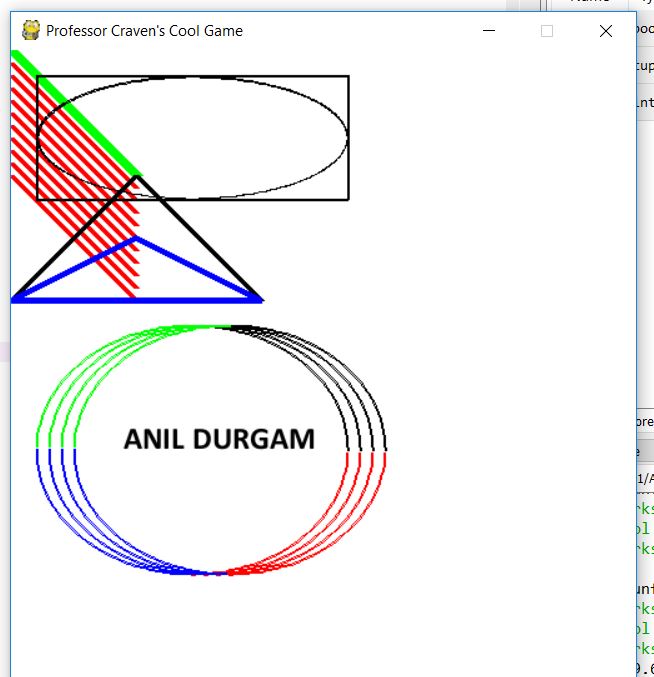
window with rectangle circle and line using pygame library in python


# Import a library of functions called 'pygame'
import pygame

# Initialize the game engine
pygame.init()

# Define some colors
BLACK = (0, 0, 0)
WHITE = (255, 255, 255)
BLUE = (0, 0, 255)
GREEN = (0, 255, 0)
RED = (255, 0, 0)

PI = 3.141592653

# Set the height and width of the screen
#size = (400, 500)
size = (500, 700)
screen = pygame.display.set_mode(size)

pygame.display.set_caption("Professor Craven's Cool Game")

# Loop until the user clicks the close button.
done = False
clock = pygame.time.Clock()

# Loop as long as done == False
while not done:

    for event in pygame.event.get():  # User did something
        if event.type == pygame.QUIT:  # If user clicked close
            done = True  # Flag that we are done so we exit this loop

    # All drawing code happens after the for loop and but
    # inside the main while not done loop.

    # Clear the screen and set the screen background
    screen.fill(WHITE)

    # Draw on the screen a line from (0,0) to (100,100)
    # 5 pixels wide.
    pygame.draw.line(screen, GREEN, [0, 0], [100, 100], 5)
    pygame.draw.line(screen, GREEN, [0, 0], [100, 100], 10)

    # Draw on the screen several lines from (0,10) to (100,110)
    # 5 pixels wide using a loop
    for y_offset in range(0, 100, 10):
        pygame.draw.line(screen, RED, [0, 10 + y_offset], [100, 110 + y_offset], 5)


    # Draw a rectangle
    pygame.draw.rect(screen, BLACK, [20, 20, 250, 100], 2)

    # Draw an ellipse, using a rectangle as the outside boundaries
    pygame.draw.ellipse(screen, BLACK, [20, 20, 250, 100], 2)

    # Draw an arc as part of an ellipse.
    # Use radians to determine what angle to draw.
    pygame.draw.arc(screen, BLACK, [20, 220, 250, 200], 0, PI / 2, 2)
    pygame.draw.arc(screen, GREEN, [20, 220, 250, 200], PI / 2, PI, 2)
    pygame.draw.arc(screen, BLUE, [20, 220, 250, 200], PI, 3 * PI / 2, 2)
    pygame.draw.arc(screen, RED, [20, 220, 250, 200], 3 * PI / 2, 2 * PI, 2)

    # This draws a triangle using the polygon command
    pygame.draw.polygon(screen, BLACK, [[100, 100], [0, 200], [200, 200]], 5)

    # Select the font to use, size, bold, italics
    font = pygame.font.SysFont('Calibri', 25, True, False)

    # Render the text. "True" means anti-aliased text.
    # Black is the color. This creates an image of the
    # letters, but does not put it on the screen
    text = font.render("ANIL DURGAM", True, BLACK)

    # Put the image of the text on the screen at 250x250
    screen.blit(text, [90, 300])

    # Go ahead and update the screen with what we've drawn.
    # This MUST happen after all the other drawing commands.
    pygame.display.flip()

    # This limits the while loop to a max of 60 times per second.
    # Leave this out and we will use all CPU we can.
    clock.tick(60)

# Be IDLE friendly
pygame.quit()


example 2:


# Import a library of functions called 'pygame'
import pygame

# Initialize the game engine
pygame.init()

# Define some colors
BLACK = (0, 0, 0)
WHITE = (255, 255, 255)
BLUE = (0, 0, 255)
GREEN = (0, 255, 0)
RED = (255, 0, 0)

PI = 3.141592653

# Set the height and width of the screen
#size = (400, 500)
size = (500, 700)
screen = pygame.display.set_mode(size)

pygame.display.set_caption("Professor Craven's Cool Game")

# Loop until the user clicks the close button.
done = False
clock = pygame.time.Clock()

# Loop as long as done == False
while not done:

    for event in pygame.event.get():  # User did something
        if event.type == pygame.QUIT:  # If user clicked close
            done = True  # Flag that we are done so we exit this loop

    # All drawing code happens after the for loop and but
    # inside the main while not done loop.

    # Clear the screen and set the screen background
    screen.fill(WHITE)

    # Draw on the screen a line from (0,0) to (100,100)
    # 5 pixels wide.
    pygame.draw.line(screen, GREEN, [0, 0], [100, 100], 5)
    pygame.draw.line(screen, GREEN, [0, 0], [100, 100], 10)

    # Draw on the screen several lines from (0,10) to (100,110)
    # 5 pixels wide using a loop
    for y_offset in range(0, 100, 10):
        pygame.draw.line(screen, RED, [0, 10 + y_offset], [100, 110 + y_offset], 5)


    # Draw a rectangle
    pygame.draw.rect(screen, BLACK, [20, 20, 250, 100], 2)

    # Draw an ellipse, using a rectangle as the outside boundaries
    pygame.draw.ellipse(screen, BLACK, [20, 20, 250, 100], 2)

    # Draw an arc as part of an ellipse.
    # Use radians to determine what angle to draw.
    pygame.draw.arc(screen, BLACK, [20, 220, 250, 200], 0, PI / 2, 2)
    pygame.draw.arc(screen, GREEN, [20, 220, 250, 200], PI / 2, PI, 2)
    pygame.draw.arc(screen, BLUE, [20, 220, 250, 200], PI, 3 * PI / 2, 2)
    pygame.draw.arc(screen, RED, [20, 220, 250, 200], 3 * PI / 2, 2 * PI, 2)
   
    ##
    ##
    pygame.draw.arc(screen, BLACK, [30, 220, 250, 200], 0, PI / 2, 2)
    pygame.draw.arc(screen, GREEN, [30, 220, 250, 200], PI / 2, PI, 2)
    pygame.draw.arc(screen, BLUE, [30, 220, 250, 200], PI, 3 * PI / 2, 2)
    pygame.draw.arc(screen, RED, [30, 220, 250, 200], 3 * PI / 2, 2 * PI, 2)
   
    ##
    ##
    pygame.draw.arc(screen, BLACK, [40, 220, 250, 200], 0, PI / 2, 2)
    pygame.draw.arc(screen, GREEN, [40, 220, 250, 200], PI / 2, PI, 2)
    pygame.draw.arc(screen, BLUE, [40, 220, 250, 200], PI, 3 * PI / 2, 2)
    pygame.draw.arc(screen, RED, [40, 220, 250, 200], 3 * PI / 2, 2 * PI, 2)
   
    ##
    ##
    pygame.draw.arc(screen, BLACK, [50, 220, 250, 200], 0, PI / 2, 2)
    pygame.draw.arc(screen, GREEN, [50, 220, 250, 200], PI / 2, PI, 2)
    pygame.draw.arc(screen, BLUE, [50, 220, 250, 200], PI, 3 * PI / 2, 2)
    pygame.draw.arc(screen, RED, [50, 220, 250, 200], 3 * PI / 2, 2 * PI, 2)

    # This draws a triangle using the polygon command
    pygame.draw.polygon(screen, BLACK, [[100, 100], [0, 200], [200, 200]], 5)
     # This draws a triangle using the polygon command
    pygame.draw.polygon(screen, BLUE, [[100, 150], [0, 200], [200, 200]], 5)
    #pygame.draw.circle()
    # Select the font to use, size, bold, italics
    font = pygame.font.SysFont('Calibri', 25, True, False)

    # Render the text. "True" means anti-aliased text.
    # Black is the color. This creates an image of the
    # letters, but does not put it on the screen
    text = font.render("ANIL DURGAM", True, BLACK)

    # Put the image of the text on the screen at 250x250
    screen.blit(text, [90, 300])

    # Go ahead and update the screen with what we've drawn.
    # This MUST happen after all the other drawing commands.
    pygame.display.flip()

    # This limits the while loop to a max of 60 times per second.
    # Leave this out and we will use all CPU we can.
    clock.tick(60)

# Be IDLE friendly
pygame.quit()

pygame_demo_window in python


import pygame

# Define some colors
BLACK = (0, 0, 0)
WHITE = (255, 255, 255)
GREEN = (0, 255, 0)
RED = (255, 0, 0)

pygame.init()

# Set the width and height of the screen [width, height]
size = (700, 500)
screen = pygame.display.set_mode(size)

pygame.display.set_caption("My Game")

# Loop until the user clicks the close button.
done = False

# Used to manage how fast the screen updates
clock = pygame.time.Clock()

# -------- Main Program Loop -----------
while not done:
    # --- Main event loop
    for event in pygame.event.get():
        if event.type == pygame.QUIT:
            done = True

    # --- Game logic should go here

    # --- Screen-clearing code goes here

    # Here, we clear the screen to white. Don't put other drawing commands
    # above this, or they will be erased with this command.

    # If you want a background image, replace this clear with blit'ing the
    # background image.
    screen.fill(GREEN)

    # --- Drawing code should go here

    # --- Go ahead and update the screen with what we've drawn.
    pygame.display.flip()

    # --- Limit to 60 frames per second
    clock.tick(60)

# Close the window and quit.
pygame.quit()

python class topic video