Friday, December 27, 2019

How to add a image to tkinter python

# -*- coding: utf-8 -*-
"""
Created on Fri Dec 27 14:38:52 2019

@author: Onyx1
"""
from tkinter import *
import tkinter as tk
from PIL import ImageTk, Image
from tkinter import ttk


#path = 'C:/xxxx/xxxx.jpg'
path = 'F:\my_workspace\python_workspace\onyx-logo.png'


root = tk.Tk()
img = ImageTk.PhotoImage(Image.open(path))
panel = tk.Label(root, image = img)
panel.pack(side = "bottom", fill = "both", expand = "yes")
root.mainloop()

output:


Saturday, December 21, 2019

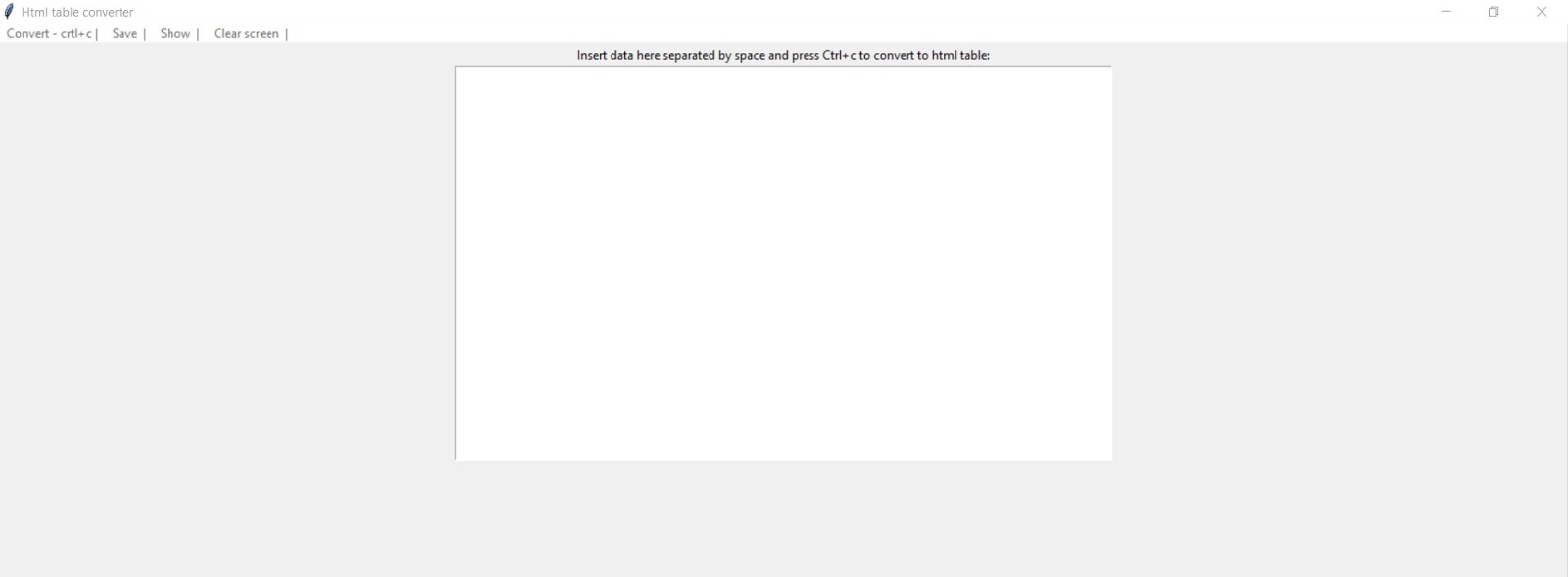
Html table using python

# -*- coding: utf-8 -*-
"""
Created on Sat Dec 21 18:01:13 2019

@author: anil durgam
"""
import os
 
html = ""
def table(x):
global html
""" Create table with data in a multiline
string as first argument x)"""
html = "<!-- table -->"
html += "<table border=1>"
for line in x.splitlines():
for n in line.split():
html += f"<td>{n}</td>"
html += "<tr>"
html += "</table>"
return html

def create(a):
tab = table(text.get("1.0", tk.END))
text.delete("1.0", tk.END)
text.insert("1.0", tab)
label['text'] = "Now you can copy the html code for the table (ctrl + a)"

def save_html():
if html != "":
with open("table.html", "w") as file:
file.write(text.get("1.0", tk.END))

def show_html():
if os.path.exists("table.html"):
os.startfile("table.html")

def convert_to_html():
html = table(text.get("1.0",tk.END))
clear()
text.insert("1.0", html)

def clear():
text.delete("1.0", tk.END)

import tkinter as tk
root = tk.Tk()
root.title("Html table converter")
label = tk.Label(root, text="Insert data here separated by space and press Ctrl+c to convert to html table:")
label.pack()
text = tk.Text(root)
text.pack()
text.bind("<Control-c>", create)
text.focus()
# create a toplevel menu
menubar = tk.Menu(root)
menubar.add_command(label="Convert - crtl+c |", command=convert_to_html)
menubar.add_command(label="Save  |", command=save_html)
menubar.add_command(label="Show  |", command=show_html)
menubar.add_command(label="Clear screen  |", command=clear)
# display the menu
root.config(menu=menubar)
root.mainloop()

output:


tkinter nested for loop in python

# !/usr/bin/python3
from  tkinter import *
root = Tk(  )
b = 0
for r in range(6):
   for c in range(6):
      b = b + 1
      Button(root, text = str(b), borderwidth = 1 ).grid(row = r,column = c)

root.mainloop()

output:

set in python


s={10,20,30,40}
print(s)
print(type(s))


output:
{40, 10, 20, 30}
<class 'set'>

example 2:
s={10,20,30,40}
s1=s
print(s)
print(type(s))
print(id(s1),id(s))

output:
{40, 10, 20, 30}
<class 'set'>
1861259155048 1861259155048

In above case both s1 and s representing same id
but copying is not done


example 3:
by copy method

s={10,20,30,40}
s1=s.copy()
print(s)
print(type(s))
print(id(s1),id(s))

output:
{40, 10, 20, 30}
<class 'set'>
1861259156840 1861259157288

both s1 and s address are different

Friday, December 20, 2019

drop down menu in python using Tkinter

# -*- coding: utf-8 -*-
"""
Created on Fri Dec 20 13:15:37 2019

@author: anil durgam
version:1.0
example:MM32 microcontroller drop down menu
"""

from tkinter import ttk
import tkinter as tk
#from pprint import pprint
#scr = Tk()


class Application(ttk.Frame):
   
    def __init__(self, main_window):
        super().__init__(main_window)
        main_window.title("MM32_MENU_SELECTOR")
        tk.Label(main_window,text="MM32 microcontroller selected",fg = "blue",font = "Times").pack()
       
        self.combo = ttk.Combobox(self)
        self.combo.place(x=50, y=50)
        self.combo["values"] = ["MM32F", "MM32L",  "MM32W", "MM32SPIN", "MM32P"]
        self.combo.bind("<<ComboboxSelected>>", self.selection_changed)
           
        main_window.configure(width=1024, height=500)
        self.place(width=300, height=200)
       
    def selection_changed(self, event):
        print("your selected::", self.combo.get())
        if self.combo.get()== "MM32F" :
            print("mm32f submenu displayed here\n")
            self.combo = ttk.Combobox(self)
            self.combo.place(x=50, y=100)
            self.combo["values"] = ["MM32F003", "MM32F031", "MM32F032", "MM32F103"]
            self.combo.bind("<<ComboboxSelected>>", self.selection_changed)
           
            if self.combo.get()=="MM32F003":
                 print("mm32f003 submenu displayed here\n")
                 self.combo = ttk.Combobox(self)
                 self.combo.place(x=50, y=150)
                 self.combo["values"] = ["MM32F003TW", "MM32F003NW"]
                 self.combo.bind("<<ComboboxSelected>>", self.selection_changed)
               
           
        elif self.combo.get()== "MM32L" :
            print("mm32L submenu displayed here\n")
            self.combo = ttk.Combobox(self)
            self.combo.place(x=50, y=100)
            self.combo["values"] = ["MM32L050", "MM32L051", "MM32L052", "MM32L061",
                      "MM32L062","MM32L072","MM32L073","MM32L362","MM32L373","MM32L384",
                      "MM32L395"]
            self.combo.bind("<<ComboboxSelected>>", self.selection_changed)
         
       
        elif self.combo.get()== "MM32W" :
            print("mm32W submenu displayed here\n")
            self.combo = ttk.Combobox(self)
            self.combo.place(x=50, y=100)
            self.combo["values"] = ["MM32W051", "MM32W062", "MM32W073", "MM32W362"
                      , "MM32W373", "MM32W384", "MM32W395"]
            self.combo.bind("<<ComboboxSelected>>", self.selection_changed)
         
           
        elif self.combo.get()== "MM32SPIN" :
            print("mm32SPIN submenu displayed here\n")
            self.combo = ttk.Combobox(self)
            self.combo.place(x=50, y=100)
            self.combo["values"] = ["MM32F003", "MM32F031", "MM32F032", "MM32F103"]
            self.combo.bind("<<ComboboxSelected>>", self.selection_changed)
           
       
        else :
            print("mm32P submenu displayed here\n")
            self.combo = ttk.Combobox(self)
            self.combo.place(x=50, y=100)
            self.combo["values"] = ["MM32F003", "MM32F031", "MM32F032", "MM32F103"]
            self.combo.bind("<<ComboboxSelected>>", self.selection_changed)
main_window = tk.Tk()
#lbl.pack()
#pprint(dict(lbl))
#root = tk.Tk()
T = tk.Text(main_window,width=100, height=10)
T.pack()
T.insert(tk.END, "MM32 main details\navailable here\n")

app = Application(main_window)
app.mainloop()


drop down menu in python

# -*- coding: utf-8 -*-
"""
Created on Fri Dec 20 13:15:37 2019

@author: anil durgam
"""

from tkinter import ttk
import tkinter as tk
class Application(ttk.Frame):
   
    def __init__(self, main_window):
        super().__init__(main_window)
        main_window.title("MM32_MENU_SELECTOR")
       
        self.combo = ttk.Combobox(self)
        self.combo.place(x=50, y=50)
        self.combo["values"] = ["MM32F", "MM32L", "MM32SPIN", "MM32W", "MM32P"]
        self.combo.bind("<<ComboboxSelected>>", self.selection_changed)
       
        main_window.configure(width=1024, height=500)
        self.place(width=300, height=200)
       
    def selection_changed(self, event):
        print("your selected::", self.combo.get())
main_window = tk.Tk()
app = Application(main_window)
app.mainloop()

Monday, December 16, 2019

tkinter text and font display


from tkinter import *
from pprint import pprint

scr = Tk()
scr.title("Label - Tkinter Widgets")

lbl = Label(scr, text="Hello", padx=5, pady=10, font=("Arial Bold", 20))


lbl.pack()
pprint(dict(lbl))
scr.mainloop()

Monday, December 9, 2019

write a program to take a tuple of numbers from the keyboard and print sum ,avg

a=eval(input("Enter  some of tuple numbers"))
l=len(a)
sum=0
for x in a:
    sum=sum+x
print("The sum=",sum)
print("The avg=",sum/l)

output:
Enter  some of tuple numbers(10,20,30)
The sum= 60
The avg= 20.0

Tuple comprehension not support in python

a=(x*x for x in range(1,11))
#print(a)
for x in a:
    print(x)

output:
1
4
9
16
25
36
49
64
81
100

Write a program for tuple packing in python

Tuple packing:
====================================

t=(10,20,30,40)
a,b,c,d=t
print("a=",a,"b=",b,"c=",c,"d=",d)

output:
a= 10 b= 20 c= 30 d= 40


Tuple packing for strings:
==============================
t="abcd"
a,b,c,d=t
print("a=",a,"b=",b,"c=",c,"d=",d)

output:
a= a b= b c= c d= d

Perform Addition, Subtraction, Multiplication, Division and Modulus operation on two integers.


#include<stdio.h>
void main()
{ int a,b;
printf("\n enter two values: ");
scanf("%d %d",&a,&b);
printf("\n a + b = %d", a+b);
printf("\n a - b = %d", a-b);
printf("\n a * b = %d", a*b);
printf("\n a / b = %d", a/b);
printf("\n a modulus b = %d", a%b);
getch();
}


input:

 enter two values: 13  5

output:

 a + b = 18           
 a - b = 8
 a * b = 65
 a / b = 2
 a modulus b = 3

python class topic video